PRODUCT INFORMATION
Description & specifications
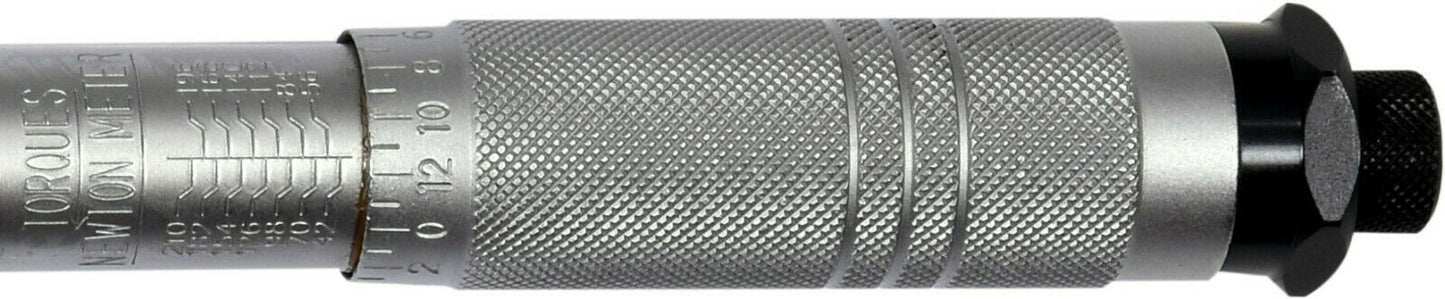
Product description key is made of chrome vanadium steel. It has a mechanical tension of a torque rip who jumps around a notch after reaching the desired attraction and creates a characteristic sound. The moment scale is placed in the handle of the key, its setting is made by turning. After setting the desired torque, lock the key with a safety lock at the end of the handle.<br style="box-sizing: border-box; color: rgb(0, 0, 0); font-family: Verdana, sans-serif; font-size: 15px; font-style: normal; font-variant-ligatures: normal; font-variant-caps: normal; font-weight: 400; letter-spacing: normal; orphans: 2; text-align: start; text-indent: 0px; text-transform: none; white-space: normal; widows: 2; word-spacing: 0px; -webkit-text-stroke-width: 0px; background-color: rgb(255, 255, 255); text-decoration-thickness: initial; text-decoration-style: initial; text-decoration-color: initial;"><br style="box-sizing: border-box; color: rgb(0, 0, 0); font-family: Verdana, sans-serif; font-size: 15px; font-style: normal; font-variant-ligatures: normal; font-variant-caps: normal; font-weight: 400; letter-spacing: normal; orphans: 2; text-align: start; text-indent: 0px; text-transform: none; white-space: normal; widows: 2; word-spacing: 0px; -webkit-text-stroke-width: 0px; background-color: rgb(255, 255, 255); text-decoration-thickness: initial; text-decoration-style: initial; text-decoration-color: initial;">The key has a GS certificate.<br style="box-sizing: border-box; color: rgb(0, 0, 0); font-family: Verdana, sans-serif; font-size: 15px; font-style: normal; font-variant-ligatures: normal; font-variant-caps: normal; font-weight: 400; letter-spacing: normal; orphans: 2; text-align: start; text-indent: 0px; text-transform: none; white-space: normal; widows: 2; word-spacing: 0px; -webkit-text-stroke-width: 0px; background-color: rgb(255, 255, 255); text-decoration-thickness: initial; text-decoration-style: initial; text-decoration-color: initial;">Use method- Select the corresponding scale in NM or LBS. Unlock the micrometer button.<br style="box-sizing: border-box; color: rgb(0, 0, 0); font-family: Verdana, sans-serif; font-size: 15px; font-style: normal; font-variant-ligatures: normal; font-variant-caps: normal; font-weight: 400; letter-spacing: normal; orphans: 2; text-align: start; text-indent: 0px; text-transform: none; white-space: normal; widows: 2; word-spacing: 0px; -webkit-text-stroke-width: 0px; background-color: rgb(255, 255, 255); text-decoration-thickness: initial; text-decoration-style: initial; text-decoration-color: initial;">- Set the micrometer button so that "0" on the scale of the button is aligned with the vertical line on the arm of the key.<br style="box-sizing: border-box; color: rgb(0, 0, 0); font-family: Verdana, sans-serif; font-size: 15px; font-style: normal; font-variant-ligatures: normal; font-variant-caps: normal; font-weight: 400; letter-spacing: normal; orphans: 2; text-align: start; text-indent: 0px; text-transform: none; white-space: normal; widows: 2; word-spacing: 0px; -webkit-text-stroke-width: 0px; background-color: rgb(255, 255, 255); text-decoration-thickness: initial; text-decoration-style: initial; text-decoration-color: initial;">- Turn the micrometer button clockwise until the desired torque is set.<br style="box-sizing: border-box; color: rgb(0, 0, 0); font-family: Verdana, sans-serif; font-size: 15px; font-style: normal; font-variant-ligatures: normal; font-variant-caps: normal; font-weight: 400; letter-spacing: normal; orphans: 2; text-align: start; text-indent: 0px; text-transform: none; white-space: normal; widows: 2; word-spacing: 0px; -webkit-text-stroke-width: 0px; background-color: rgb(255, 255, 255); text-decoration-thickness: initial; text-decoration-style: initial; text-decoration-color: initial;">- The desired torque is set when the division on the micrometer button matches the vertical line on the key arm.<br style="box-sizing: border-box; color: rgb(0, 0, 0); font-family: Verdana, sans-serif; font-size: 15px; font-style: normal; font-variant-ligatures: normal; font-variant-caps: normal; font-weight: 400; letter-spacing: normal; orphans: 2; text-align: start; text-indent: 0px; text-transform: none; white-space: normal; widows: 2; word-spacing: 0px; -webkit-text-stroke-width: 0px; background-color: rgb(255, 255, 255); text-decoration-thickness: initial; text-decoration-style: initial; text-decoration-color: initial;">- Then lock the micrometric button and set the corresponding direction of rotation of the ratchet. Then the key is ready for use.<br style="box-sizing: border-box; color: rgb(0, 0, 0); font-family: Verdana, sans-serif; font-size: 15px; font-style: normal; font-variant-ligatures: normal; font-variant-caps: normal; font-weight: 400; letter-spacing: normal; orphans: 2; text-align: start; text-indent: 0px; text-transform: none; white-space: normal; widows: 2; word-spacing: 0px; -webkit-text-stroke-width: 0px; background-color: rgb(255, 255, 255); text-decoration-thickness: initial; text-decoration-style: initial; text-decoration-color: initial;">- Put the corresponding socket into the driver of the key. When putting on, the set torque is reached when the button clicks. When you hear or feel clicking, stop pulling.<br style="box-sizing: border-box; color: rgb(0, 0, 0); font-family: Verdana, sans-serif; font-size: 15px; font-style: normal; font-variant-ligatures: normal; font-variant-caps: normal; font-weight: 400; letter-spacing: normal; orphans: 2; text-align: start; text-indent: 0px; text-transform: none; white-space: normal; widows: 2; word-spacing: 0px; -webkit-text-stroke-width: 0px; background-color: rgb(255, 255, 255); text-decoration-thickness: initial; text-decoration-style: initial; text-decoration-color: initial;">Content of the package torque key<br style="box-sizing: border-box; color: rgb(0, 0, 0); font-family: Verdana, sans-serif; font-size: 15px; font-style: normal; font-variant-ligatures: normal; font-variant-caps: normal; font-weight: 400; letter-spacing: normal; orphans: 2; text-align: start; text-indent: 0px; text-transform: none; white-space: normal; widows: 2; word-spacing: 0px; -webkit-text-stroke-width: 0px; background-color: rgb(255, 255, 255); text-decoration-thickness: initial; text-decoration-style: initial; text-decoration-color: initial;">- Factory calibration certificate (individually for each key, marked with the serial number of the key)<br style="box-sizing: border-box; color: rgb(0, 0, 0); font-family: Verdana, sans-serif; font-size: 15px; font-style: normal; font-variant-ligatures: normal; font-variant-caps: normal; font-weight: 400; letter-spacing: normal; orphans: 2; text-align: start; text-indent: 0px; text-transform: none; white-space: normal; widows: 2; word-spacing: 0px; -webkit-text-stroke-width: 0px; background-color: rgb(255, 255, 255); text-decoration-thickness: initial; text-decoration-style: initial; text-decoration-color: initial;">- User Guide<br style="box-sizing: border-box; color: rgb(0, 0, 0); font-family: Verdana, sans-serif; font-size: 15px; font-style: normal; font-variant-ligatures: normal; font-variant-caps: normal; font-weight: 400; letter-spacing: normal; orphans: 2; text-align: start; text-indent: 0px; text-transform: none; white-space: normal; widows: 2; word-spacing: 0px; -webkit-text-stroke-width: 0px; background-color: rgb(255, 255, 255); text-decoration-thickness: initial; text-decoration-style: initial; text-decoration-color: initial;">- guarantee card<br style="box-sizing: border-box; color: rgb(0, 0, 0); font-family: Verdana, sans-serif; font-size: 15px; font-style: normal; font-variant-ligatures: normal; font-variant-caps: normal; font-weight: 400; letter-spacing: normal; orphans: 2; text-align: start; text-indent: 0px; text-transform: none; white-space: normal; widows: 2; word-spacing: 0px; -webkit-text-stroke-width: 0px; background-color: rgb(255, 255, 255); text-decoration-thickness: initial; text-decoration-style: initial; text-decoration-color: initial;">- Suitcase<br><br>
Product description key is made of chrome vanadium steel. It has a mechanical tension of a torque rip who jumps around a notch after reaching the desired attraction and creates a characteristic sound. The moment scale is placed in the handle of the key, its setting is made by turning. After setting the desired torque, lock the key with a safety lock at the end of the handle.The key has a GS certificate.Use method- Select the corresponding scale in NM or LBS. Unlock the micrometer button.- Set the micrometer button so that "0" on the scale of the button is aligned with the vertical line on the arm of the key.- Turn the micrometer button clockwise until the desired torque is set.- The desired torque is set when the division on the micrometer button matches the vertical line on the key arm.- Then lock the micrometric button and set the corresponding direction of rotation of the ratchet. Then the key is ready for use.- Put the corresponding socket into the driver of the key. When putting on, the set torque is reached when the button clicks. When you hear or feel clicking, stop pulling.Content of the package torque key- Factory calibration certificate (individually for each key, marked with the serial number of the key)- User Guide- guarantee card- Suitcase